Practical step-by-step guide based on observed live commerce workflows used by small sellers and creators. Focuses on setup, technical basics, simple scripts, and the promotional loop that turns viewers into buyers. Presented in plain language for newcomers launching their first TikTok Live shopping session.
 +
+
Intro — Why TikTok Live Is Worth Trying (Even If You’re Nervous)
Live selling feels scary: you can’t edit, you must talk in real time, and the chat never stops. But for product sellers, nothing beats the immediacy of live commerce. People buy when they see the item in action, hear a real voice, and witness others confirming the product works. Even small sellers can get their first orders by running short, well-structured Lives.
Section 1 — The real obstacles beginners face
Beginners usually fail at Lives because of a few predictable problems:
- Technical glitches (bad audio or internet) that kill trust instantly.
- No clear offer or CTA — viewers enjoy the show but don’t know how to buy.
- Weak moderation: spam and unanswered questions swamp the chat.
- Poor product selection for live format — some products simply don’t demo well.
Understanding these problems lets you avoid them from day one.
Section 2 — The simple mechanics that make a live sellable
Live selling uses three basic psychological triggers:
- Demonstration — seeing a product used reduces doubt.
- Social proof — live comments and immediate reactions increase trust.
- Urgency — limited stock, timer-based offers, or exclusive codes prompt action.
Technically you need: a stable phone or camera, decent microphone, good lighting, and a simple landing place for buyers (TikTok Shop, bio link, or pinned comment).
Section 3 — Beginner step-by-step: your first Live (30–45 mins plan)
Before you go live (Day-of checklist):
- Test Wi-Fi speed (aim for 10 Mbps up).
- Charge the phone and use a tripod.
- Prepare product(s) and demo props.
- Have one moderator (friend or team) to pin comments and handle orders.
- Prepare a simple 3-line script and 2 offers (discount + bundle).
Live structure (ideal 30–45 minutes):
- 0–2 min — Hook & Intro: “Hi — today I’ll show a gadget that fixes X in under 30 seconds. If you stay till minute 5 I’ll share a discount!”
- 2–15 min — Demo 1: Show product, use it live, mention price and benefits. Pin the link. Accept questions.
- 15–25 min — Demo 2 / Variation: Show a different use case or a bundled offer.
- 25–35 min — Social proof: Read top comments, show customer video clips, confirm stock.
- 35–40 min — Urgency close: “Only 10 left at this price” + countdown.
- 40–45 min — Wrap & Next Steps: Thank viewers, mention when the next Live will be, and pin follow-up CTA.
Post-live: Save the Live for rewatch (if TikTok allows), harvest comments for content ideas and follow-up messages to buyers.
Section 4 — Common mistakes & how to avoid them (EEAT)
From dozens of beginner Lives, common errors repeat:
- Overcomplicating demos: Keep it short and obvious — one feature per demo.
- Ignoring chat: Even a 30-second reply to a viewer drastically increases trust. Use a moderator if you’re busy demoing.
- No clear purchasing flow: Always pin a link and explain where to click. If using codes, repeat them frequently.
- No follow-up plan: After the Live, post a summary clip and a pinned FAQ comment.
These practical fixes are the same ones small sellers use to turn viewers into buyers.
Section 5 — How KOLSprite helps your first Live succeed
KOLSprite speeds all the prep and post analysis:
- Product fit: Scan TikTok for similar product demos and see how viewers respond. Avoid items that get lots of views but no buying comments.
- Script inspiration: Pull high-performing demo hooks and adapt the structure (don’t copy word-for-word).
- Performance review: After the Live, export engagement data: peak chat times, top comment phrases, replay watch time. Use those signals to improve the next Live.
In short: use KOLSprite to pick products that demo well, borrow proven hooks, and learn quickly from each session.
Table — Quick Live Planning Cheat-sheet
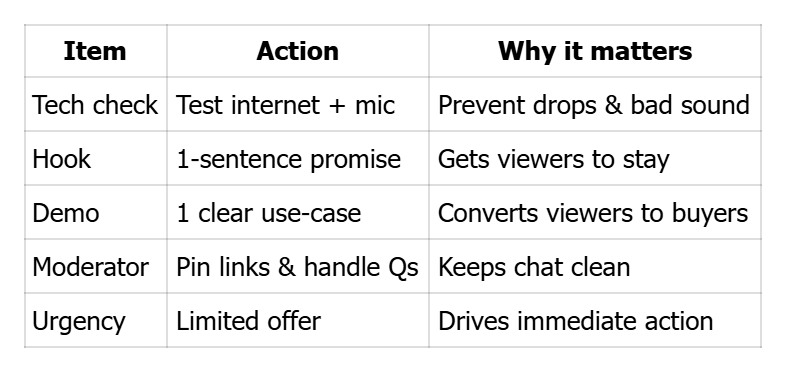 +
+
Checklist (before you go live)
- ⬜ Stable internet & charged device
- ⬜ Tripod + good lighting
- ⬜ Moderator assigned
- ⬜ Pin link / CTA ready
- ⬜ 1–2 short offers prepared
CTA
Ready to plan your first profitable Live? Use KOLSprite to find the best demo hooks and products to test — pick your product, write a quick script, and go live with confidence.


 Refer & Earn